Changelog

Follow new updates and improvements to Spiral.

December 4th, 2025

Writing Styles is one of Spiral's most popular features—and one of the most requested for improvements. We've been heads-down on a major update. Here's what's new:

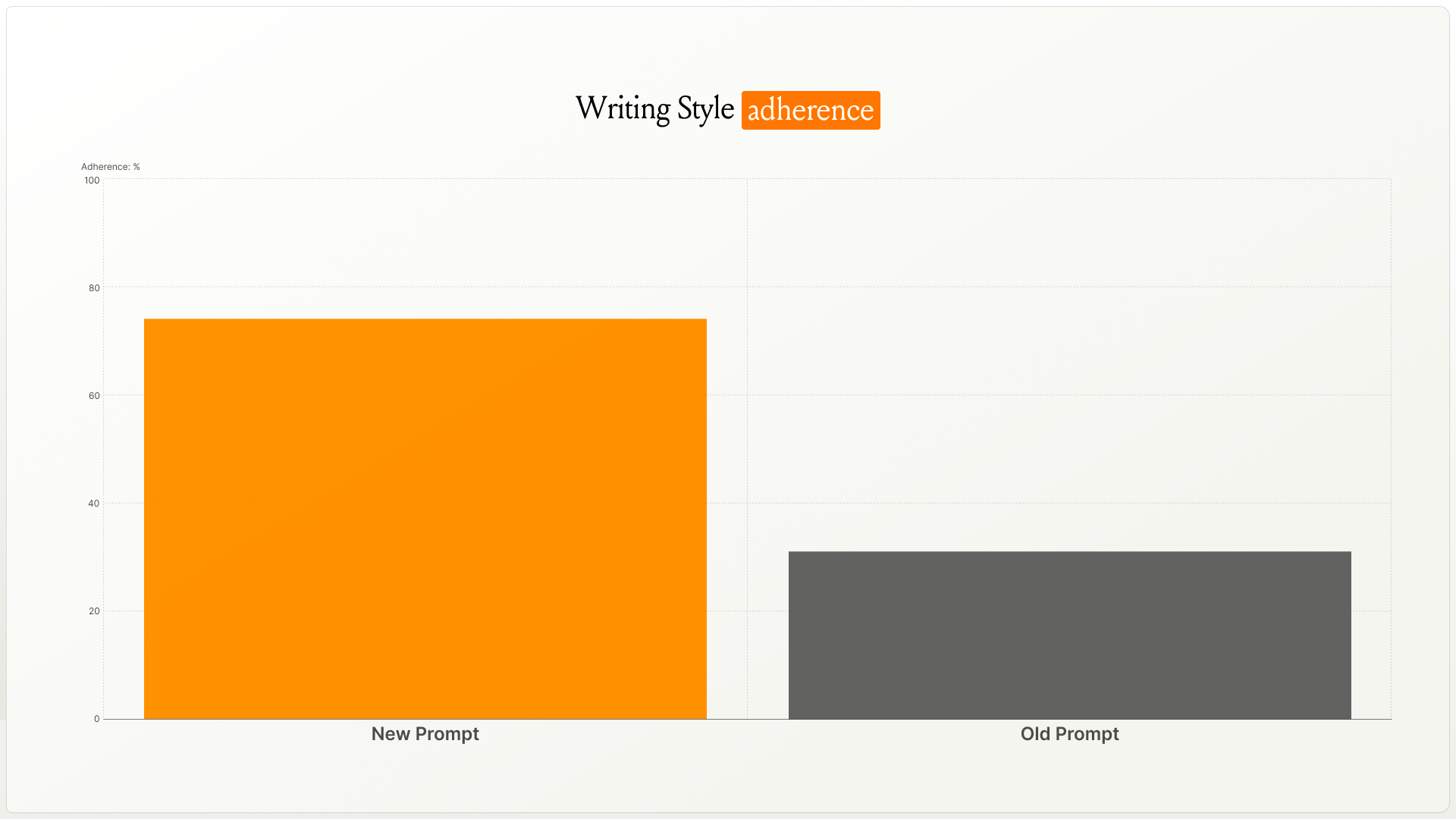
✨ 40% better style matching

The engine behind Writing Styles is smarter. We rebuilt the underlying prompt, and in testing, style matching improved by over 40%.

Drafts match your target voice more closely—whether that's your own or one you're emulating.

🚀 How to upgrade

Head to your Writing Style settings. If your style hasn't been upgraded yet, you'll see an “Upgrade” button—click it and Spiral will upgrade your style in about 5–10 minutes.

🔧 Edit your style guide directly

You can now open and edit the style guide Spiral creates for you. Tweak tone rules, adjust phrase patterns, or fine-tune anything that isn't quite right—it's your style, your call.

🎯 Cleaner setup experience

  • Clearer guidance walks you through each step

  • A new flow makes it easier to pick which Twitter/X posts to include in your Writing Style

  • We'll email you when your style is ready to use

🛠️ Bug fixes

  • Improved fetching for newer and older posts from X

  • Various stability improvements

👀 What's coming next?

Two big things we're working on:

  1. A community library. Browse Writing Styles from the Every team, popular writers, and other Spiral users. Find one you like, remix it, or use it as is. You'll also be able to share your own styles.

  1. Chat-based style refinement. Instead of editing your style guide manually, you'll be able to tell Spiral what to change—and it'll update your style as you write together.

More on both soon.

Danny

September 30th, 2025

You can now ground Spiral in a specific project or business so drafts stay concrete and on-topic.

Workspaces store project or business-specific knowledge that Spiral can reference. Upload files, keep context together, and share it with your team.

How to use it: Create a workspace, upload your docs, then invite teammates to collaborate. Spiral will use that workspace as the source of truth.

Share a workspace with your team so every draft pulls from the same facts and language.

Use cases:

  • Kicking off a product launch? Keep specs, messaging, and timelines in one place.

  • Writing sales copy for a client? Pull details from their workspace, not memory.

  • Collaborating across a team? Everyone writes from the same sources.

Try it: Create a workspace, add a few files, and ask Spiral to “Draft a one-pager using the workspace details.”

September 12th, 2025

You can now create writing styles from any public Twitter/X or LinkedIn account.

Spiral fetches recent posts to learn that voice.

How to try it: Head over to Writing Styles and either create a new writing style or add a profile to an existing writing style.

Bug fixes:

  • Spiral now tells you when we’re having issues due to an upstream provider and will also fallback to a smaller model if the provider is still not working after 5 retries

  • Various style and UX bug fixes

September 5th, 2025

Spiral now adapts to your writing styles!

What’s new

  • Writing styles: Upload or paste samples of your writing. Spiral learns from them and applies your voice to new drafts.

  • Monologue integration: Use speech-to-text inside Spiral with Monologue to capture ideas and drafts hands-free.

What’s next

  • Coming soon: Share links and profiles so Spiral can pull examples from the internet to refine your writing styles.

Also improved

  • A beautiful new onboarding that explains Spiral’s features and gets you productive fast.

  • Various bug fixes and small style tweaks for speed and readability.

August 18th, 2025

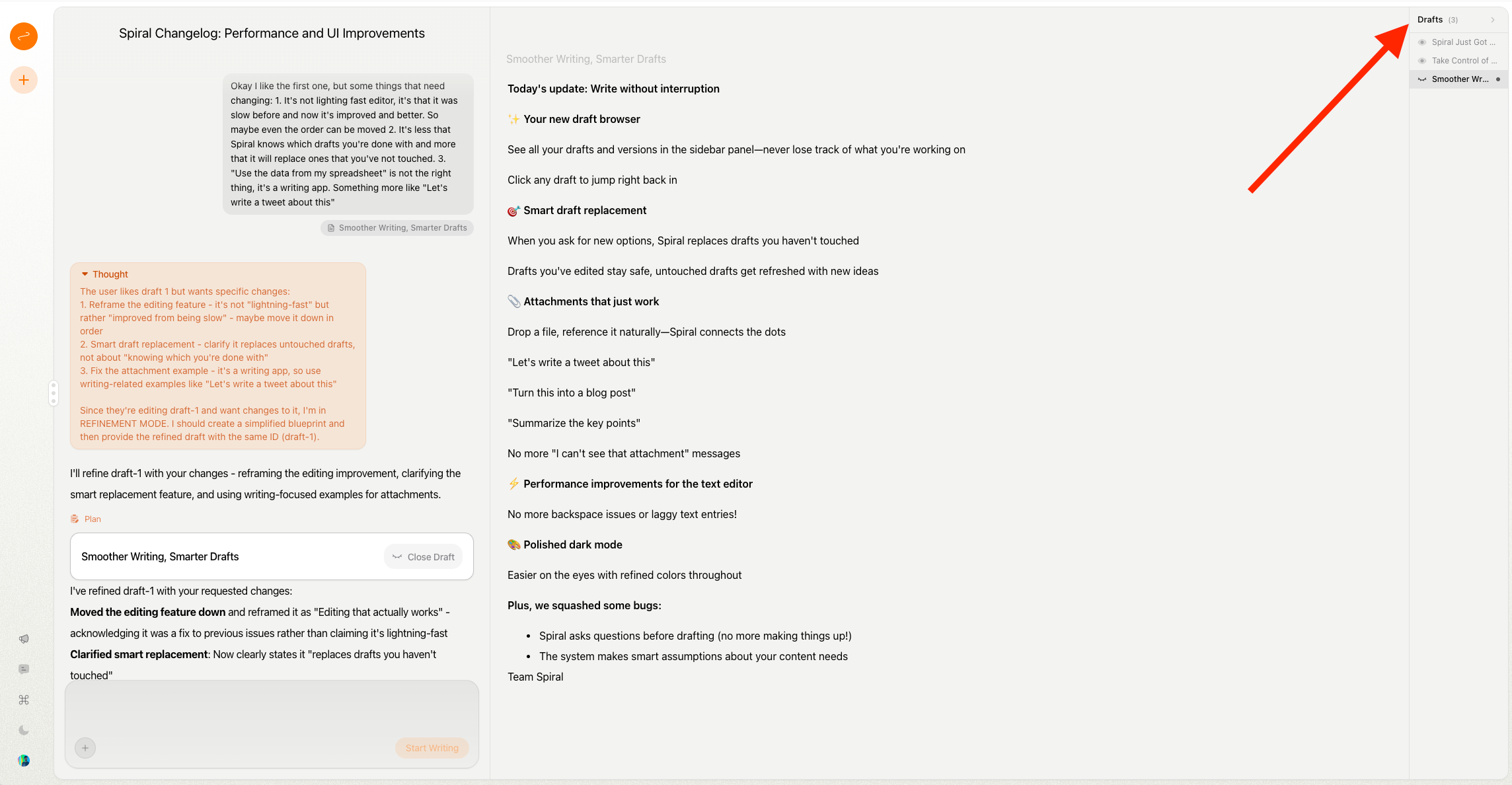
🗄 New draft browser

See all your drafts and versions in the sidebar panel—never lose track of what you're working on

Click any draft to jump right back in

🎯 Smart draft replacement

When you ask for new options, Spiral replaces drafts you haven't touched

Drafts you've edited stay safe, untouched drafts get refreshed with new ideas

📎 Attachments that just work

Drop a file, reference it naturally—Spiral connects the dots

"Let's write a tweet about this"

"Turn this into a blog post"

"Summarize the key points"

No more "I can't see that attachment" messages

Performance improvements for the text editor

No more backspace issues or laggy text entries!

🎨 Polished dark mode

Easier on the eyes with refined colors throughout

Plus, we squashed some bugs:

  • Spiral asks questions before drafting (no more making things up!)

  • The system makes smart assumptions about your content needs

Team Spiral