Changelog

Follow new updates and improvements to Spiral.

Spiral—Feb/March Updates

There's a lot happening at Spiral. We've been heads-down shipping over the past few weeks, and we wanted to share what's new.

New Features

  • X/Twitter style: Connect your account and Spiral builds a personal style guide from up to 1,000 of your latest tweets, weighted by engagement. Head to the Styles page and click “X/Twitter style—once your account is connected (read-only), Spiral will handle the rest.

  • Style from any URL: Build a style from a single page, a full website, an RSS feed, or a sitemap. Spiral pulls from up to 20 recent posts automatically—no copying and pasting.

  • Workspaces: Toggle between workspaces that keep your Styles, knowledge, and chats organized. Invite colleagues so your whole team writes in the same voice.

Improvements

  • Cleaner & faster editor: The whole app got a polish. Spiral now remembers your last style, autoscrolls as text comes in, shows more granular progress, and references attachments more intelligently.

Bug fixes

  • Fixed silent delays in long writing jobs and slowdowns from conversation compression. The writing experience is significantly more stable.

What's next

  • Style guides that update automatically as you publish new posts, and Spiral in more places, including the agent interfaces we're all spending more time in.

Stay tuned!
Writing Styles just got a major upgrade

Writing Styles is one of Spiral's most popular features—and one of the most requested for improvements. We've been heads-down on a major update. Here's what's new:

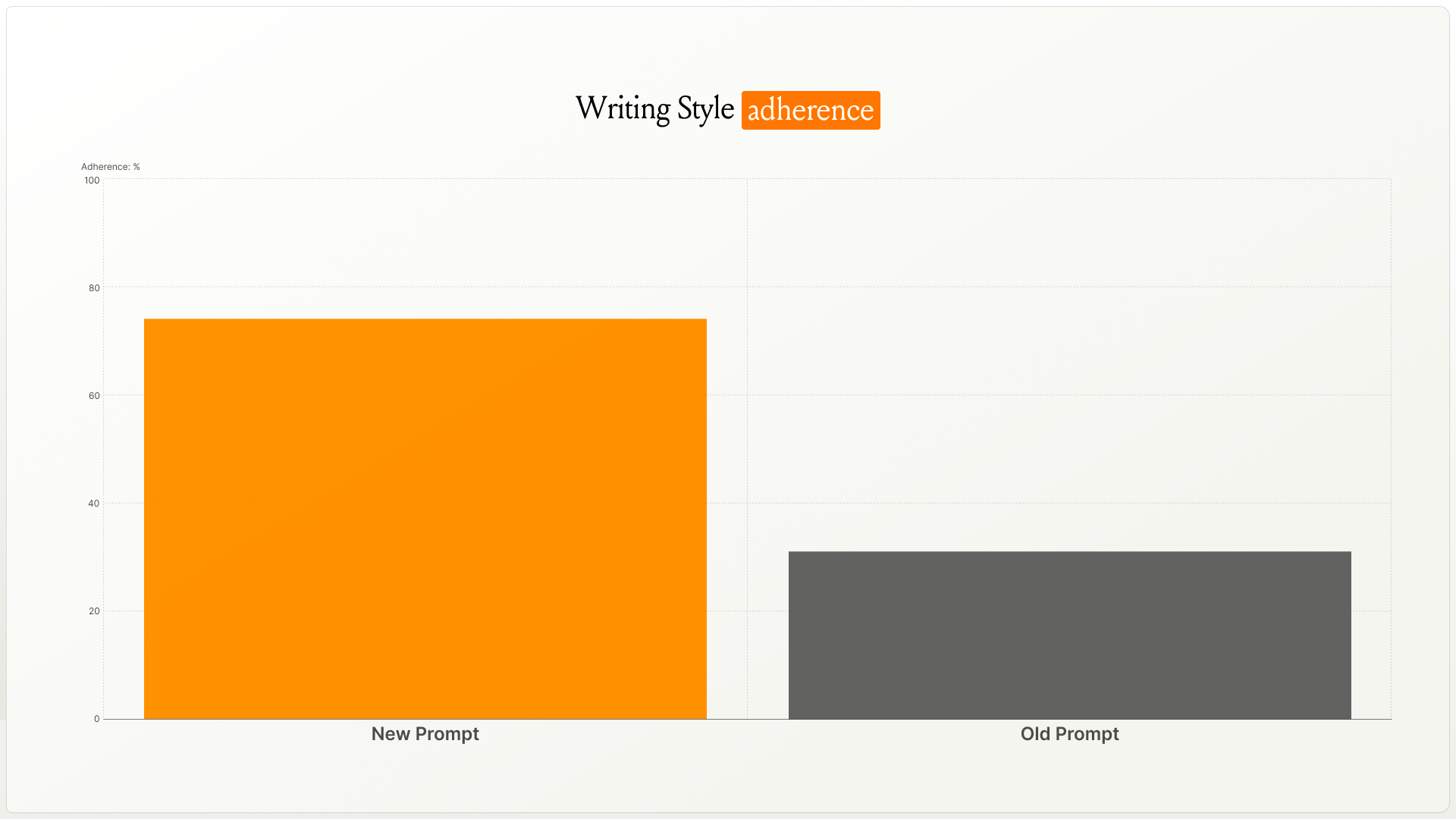
✨ 40% better style matching

The engine behind Writing Styles is smarter. We rebuilt the underlying prompt, and in testing, style matching improved by over 40%.

Drafts match your target voice more closely—whether that's your own or one you're emulating.

🚀 How to upgrade

Head to your Writing Style settings. If your style hasn't been upgraded yet, you'll see an “Upgrade” button—click it and Spiral will upgrade your style in about 5–10 minutes.

🔧 Edit your style guide directly

You can now open and edit the style guide Spiral creates for you. Tweak tone rules, adjust phrase patterns, or fine-tune anything that isn't quite right—it's your style, your call.

🎯 Cleaner setup experience

  • Clearer guidance walks you through each step

  • A new flow makes it easier to pick which Twitter/X posts to include in your Writing Style

  • We'll email you when your style is ready to use

🛠️ Bug fixes

  • Improved fetching for newer and older posts from X

  • Various stability improvements

👀 What's coming next?

Two big things we're working on:

  1. A community library. Browse Writing Styles from the Every team, popular writers, and other Spiral users. Find one you like, remix it, or use it as is. You'll also be able to share your own styles.

  1. Chat-based style refinement. Instead of editing your style guide manually, you'll be able to tell Spiral what to change—and it'll update your style as you write together.

More on both soon.

Danny

Workspaces

You can now ground Spiral in a specific project or business so drafts stay concrete and on-topic.

Workspaces store project or business-specific knowledge that Spiral can reference. Upload files, keep context together, and share it with your team.

How to use it: Create a workspace, upload your docs, then invite teammates to collaborate. Spiral will use that workspace as the source of truth.

Share a workspace with your team so every draft pulls from the same facts and language.

Use cases:

  • Kicking off a product launch? Keep specs, messaging, and timelines in one place.

  • Writing sales copy for a client? Pull details from their workspace, not memory.

  • Collaborating across a team? Everyone writes from the same sources.

Try it: Create a workspace, add a few files, and ask Spiral to “Draft a one-pager using the workspace details.”

Earlier updates